Live Action Area
The Live Action Area contains the recorded image area, Lookaround area, and various overlays. The color of each overlay can be customized to maximize the contrast between the guide(s) and scene being captured.
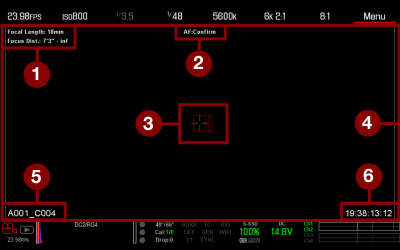
Figure: Live Action Area
The Live Action Area includes the following GUI elements:
|
# |
ITEM |
Description |
Details |
|---|---|---|---|
|
1 |
Lens Information |
Lens information when using supported Canon lenses |
|
|
2 |
AF Status |
Currently selected auto focus mode |
|
|
3 |
Center Crosshair and Spot Focus Guide |
Crosshair: Center of selected guide Reference guides: Safe Action/Safe Title, Picture Center, Grid Overlay |
|
|
4 |
Frame Guides |
Record or sensor projection area |
|
|
5 |
Clip Filename |
Filename of the clip being recorded, or filename of the next clip to be recorded |
N/A |
|
6 |
Timecode Value |
Current timecode value |
Lens Information
This section describes the lens information displays when a supported lens is attached.
PL Lenses
Displays the focal length and focal distance when a DSMC PL mount is installed and a lens with the Cooke S4/i system (or equivalent) is attached. For more information, go to Lens Tab.
Canon and Nikon Lenses
The camera displays the focal length and focal distance when